
Script to video AI
Script to video, with the same characters in every scene
Paste a screenplay, a short story or a few chapters of a book. Insaga reads it the way a director would: it splits the text into scenes, finds the cast and the places, designs each of them once, draws and animates every shot, gives every character a voice and assembles the result on a timeline with subtitles.
100 free credits · no card
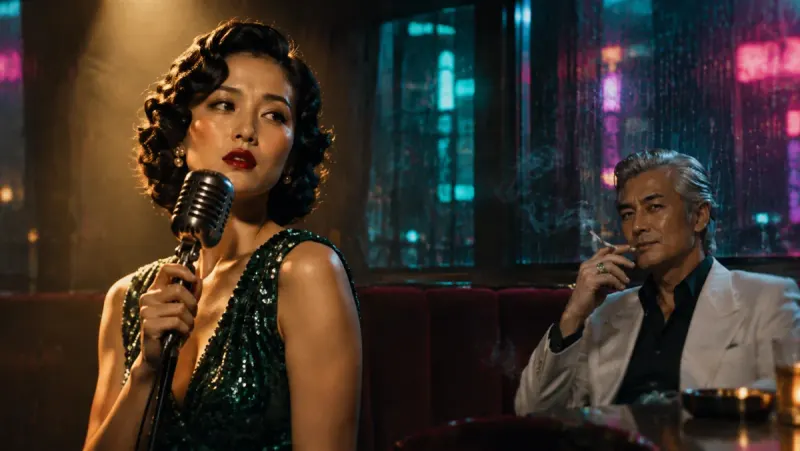
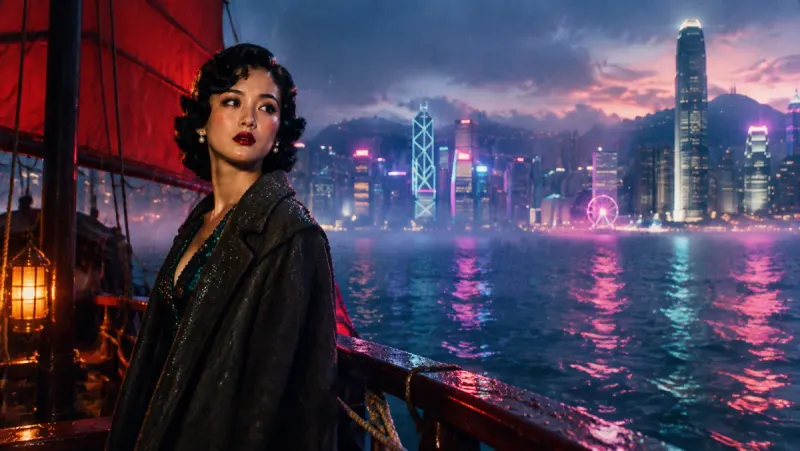
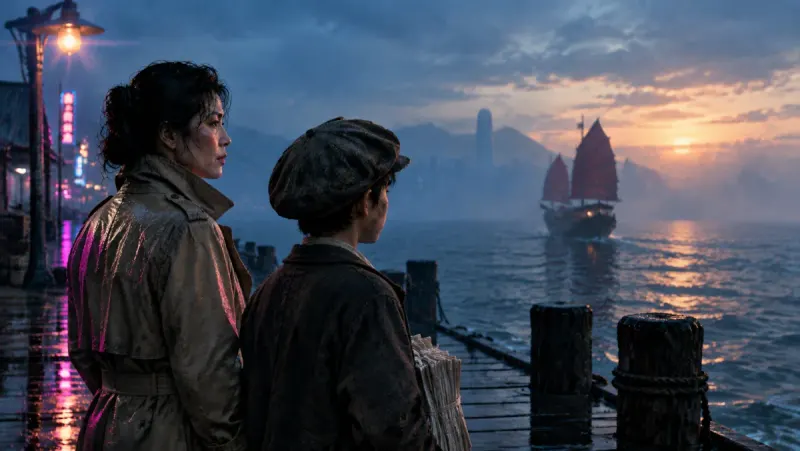
What happens to your text, step by step
Turning a script into video is a chain of decisions a film crew would normally make: where a scene ends, who is in the shot, what they look like, who says which line. Insaga makes each of them from your text, and you step in where a change is cheapest: the cast before any shot is drawn, a single shot before it is animated, a line before it is voiced.
Paste the text
A screenplay with scene headings, a short story in plain prose, a play that is all dialogue or a whole novel; if a very long text does not fit into one project, the limit is raised for your account. Then pick one of 100+ styles, from stickman and manga to oil painting, or a custom style built from your own reference images (on higher plans), and a frame: widescreen 16:9 or cinematic 2.35:1.
Insaga splits it into scenes
The text is read as a story, not as a list of sentences. Insaga divides it into scenes on its own and works out, for each one, who is there, where it takes place and what changes. Those answers become the shots.
The cast and the locations get their look
Every character gets a reference sheet: face, hair, clothes and the small details that make them recognisable. Every place the story returns to gets a look of its own. This is the moment to fix anything that is off, because every shot after this is drawn from these sheets.
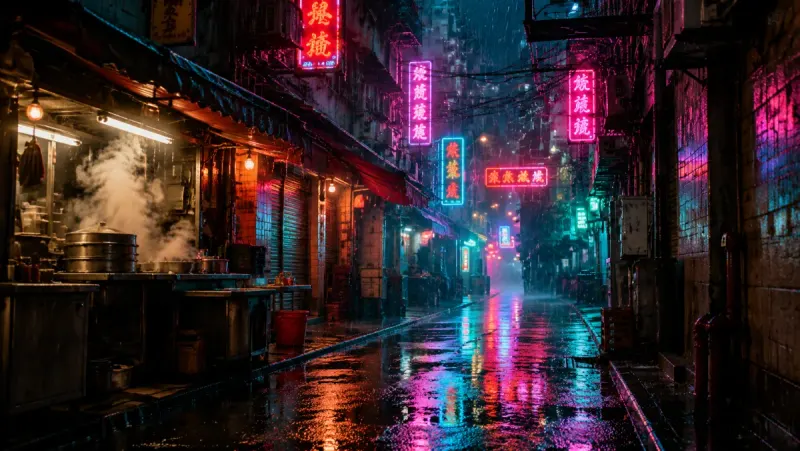
A location sheet from a noir story: the rainy alley, designed with nobody in it yet. Every shot is drawn, then animated
Insaga draws each shot with the cast from the sheets, in the style you chose. You look at the stills first. A shot you don't like is redrawn on its own, and the rest stay as they are. Approved shots are then animated into video clips of about eight seconds each. Animation runs on the Studio plan, where image and animation generation is unlimited.
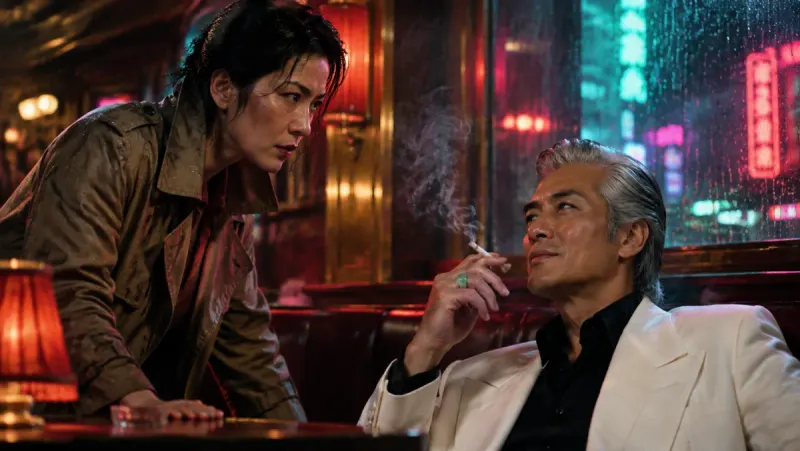
A drawn shot from the same noir story, before it is animated. The voices are cast
Insaga splits the text into lines and works out who says each one. You give every character a voice of their own, chosen from 6,000+, and the narrator one more. If a line lands on the wrong speaker, you move it by hand, and a character you leave without a voice is read by the narrator. Voiceover is part of the paid plans.
It all meets on the timeline
The clips are laid out on a timeline and assembled to the narration automatically. Add automatic subtitles in one of 31 styles, your own music track, transitions and camera moves, then export an MP4 in up to 4K. On the Studio plan an autopilot can run the whole chain, from story to exported video, in one go.
The sheets behind the frames
The frames on this page come from one noir story with four people in it: a detective, a nightclub singer who goes missing, a newsboy and a grey-haired man in a white suit. Before a single shot was drawn, the breakdown gave each of them a character sheet, and the alley got the location sheet from step 3.
The four character sheets
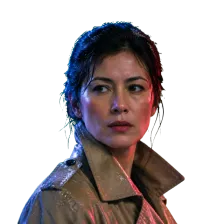 The detective
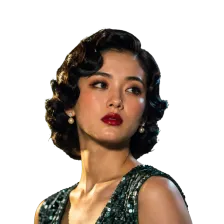 The singer
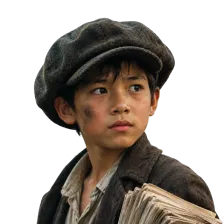 The newsboy
 The man in white
Compare the sheets with the frames above: the trench coat, the finger waves, the flat cap and the white suit hold in a club, on a boat and on a pier at dawn. That consistency is settled at the breakdown stage, which is why it pays to get the cast right before anything is drawn.
Which texts work, and how each one is read
Insaga takes plain text and needs no special format. Different kinds of writing still give it different amounts to work with.
- A screenplay
- Scene headings, character names above their lines and short action paragraphs are the clearest input there is. The scene breaks are obvious, every line already has a speaker, and the action lines describe what the camera should see.
- A short story
- Works well. Insaga cuts the prose into scenes, gives each line of dialogue to whoever says it and leaves the rest to the narrator, while the descriptions feed the character sheets and the locations.
- Chapters of a book
- A whole book can go in at once; many creators still release it as a series of episodes, one part per video. To bring the same heroes into the next episode, upload their character pictures from the previous one.
- Mostly dialogue
- A play, an interview, an argument in a kitchen. Every speaking character gets a voice, so a scene built on talk works well, as long as it is clear who is talking.
- Narration only
- History, true crime, a fairy tale read aloud, a YouTube explainer. One narrator voice carries the whole video, and the shots show what it describes.
- A synopsis or an outline
- It works, but two lines of summary give little to draw from, so Insaga has to invent more of the cast and the settings. Expand the scenes you care about most.
The same scene, written two ways
Before: “That night Anna was scared, but she went to the lighthouse anyway.”
After: “Night, heavy rain. ANNA (12, yellow raincoat, a torch in her hand) runs along the pier towards the lighthouse. At the door she stops, looks back at the black water, then pushes the door open.”
The second version gives Insaga a place, a time of day, a look for Anna and three actions that turn into shots. The first one will be drawn too, but Insaga will have to decide almost everything for you.
How to write a script that turns into better video
Give every character one name. If the captain is also “the old man”, “Eli” and “her grandfather”, the breakdown may see three different people. Pick one name, use it every time, and keep nicknames for dialogue.
Describe each character once, early and concretely. “A tall woman in a yellow coat with a scar over one eyebrow” gives the character sheet something to hold on to; “she was beautiful” does not. One precise description at the first appearance is enough, because the sheet carries it into every later shot.
Make scene changes visible. Start a new paragraph, or write a heading such as “EXT. HARBOUR – DAWN”, wherever the place or the time changes. A jump like “three years later” buried in the middle of a sentence is easy to miss.
Write what a camera could see. “He was sure she was lying” cannot be drawn. “He puts his cup down and doesn't drink” can. Feelings come through best as actions, faces and gestures.
Say who is speaking. In prose, tag the line (“…,” said Mira) at least whenever the speaker changes. In a screenplay, the name above the line does the job. Clear tags are what let every character keep a voice of their own.
Keep the narrator and the characters apart. Text that nobody in the story says goes to the narrator. If a character's thoughts should be heard in their own voice, write them as speech.
Pace it for the screen. A long paragraph of scenery can become several quiet shots, while a fight squeezed into one sentence may end up as a single frame. If a moment matters, give it room on the page.
Test one scene first. Paste the opening scene, check the character sheets and the first frames, adjust the text, then paste the rest. It costs less and shows you early how Insaga reads your writing.
Drawn shots or stock clips: two kinds of text to video
Many text to video tools work from a footage library: they read your script sentence by sentence and match each sentence to an existing stock clip. That is quick and suits some videos. Insaga works the other way round and draws a new shot for every moment of the story.
| Insaga | Stock-footage text to video | |
|---|---|---|
| Where each picture comes from | Drawn for your script, shot by shot | Picked from a library of existing clips |
| Your characters | Designed once, the same in every scene | Whoever happens to be in each clip |
| Invented worlds | Anything you can write: a dragon's cave, a city in the clouds, a talking fox | Only what someone has already filmed |
| Look | 100+ styles from stickman to oil painting, or your own | The look of the footage |
| Best suited to | Stories, fiction, cartoons, series with recurring characters | Explainers about real places, products and news |
Both approaches have their place. A video about real places, products or events that needs real footage may be better served by a stock library. A story with characters needs its shots drawn for it.
Questions about turning a script into video
What does script to video AI actually do with my text?
It treats the text as a story to film. Insaga splits it into scenes, finds the characters and the places, designs each of them once, draws and animates every shot, voices the dialogue and the narration and puts it all on a timeline. You can step in at every stage: the cast before drawing, a single shot before animation, a line before it is voiced.
Is script to video the same as text to video?
Not quite. Text to video usually means one prompt in and one short clip out, and you plan the sequence yourself. Script to video starts from a whole text and plans the sequence for you: the scenes, the shots, who is in them and in what order.
What format should my script be in?
Plain text is enough. Screenplay format, prose, a play or a mix of them all work. What helps most is not the format but clarity: one name per character, visible scene changes and a clear sign of who is speaking.
Do I have to write a prompt for every shot?
No. The shots are planned from your text, so you edit the story, not prompts. If one shot comes out wrong, you redraw just that shot.
How does Insaga know which character says which line?
When the voices are cast, Insaga splits the text into lines and assigns each one to a speaker. You can see the split and hand any line to a different character. Text that belongs to no character, and the lines of a character left without a voice, are read by the narrator.
What if my story never says what the characters look like?
Insaga designs them anyway, from what the text implies and from the style you chose. You see the result on the character sheets before anything else is drawn, and you can change a character there or replace their picture with an image you upload. If a detail matters to you, like a scar, a red coat or a missing tooth, write it into the text once.
Can Insaga run the whole pipeline on its own?
On the Studio plan, yes. The autopilot takes the story through images, animation, voiceover and the timeline to an exported video in one run. You can also go stage by stage and check each step yourself, which is the better choice the first time you try a new kind of text.
How much of my script can I try for free?
A new account gets 100 credits once, with no card. That is enough to set up the cast and draw frames for a short scene, so you can see the character sheets and judge how Insaga reads your writing. Animation, voiceover and export need a paid plan; on the Studio plan image and animation generation is unlimited.
Where to go next
Paste your first scene
See how Insaga reads your writing: the scenes it finds, the cast it designs, the first frames it draws. Your first 100 credits are free, and you do not need a card.
Works in the browser. No install.