Insaga

AI anime generator

AI anime generator for anime videos and episodes

Paste a chapter of your light novel, the script of your manga or a story written for your channel. Insaga splits it into scenes, draws a model sheet for every character and keeps each of them on-model from frame to frame, in the anime look you choose. Then the frames are animated, every character gets a voice, and you cut the episode with subtitles in the same studio.

100 free credits · no card

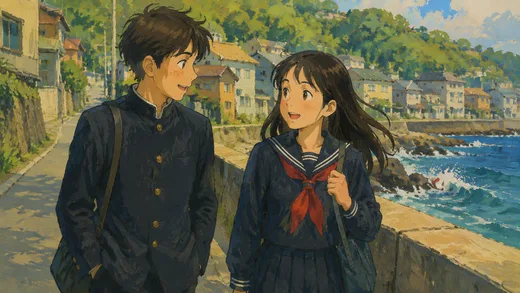
A boy in a black stand-collar school uniform and a girl in a sailor uniform with a red scarf talk as they walk along a seawall, waves breaking below a hillside town, painted in gouache
Storybook gouache · GPT Image
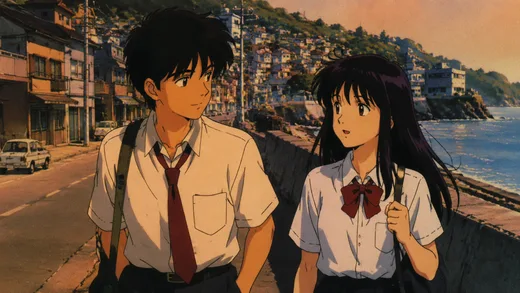
A boy and a girl in white summer uniforms, his red tie and her red bow, walk a seaside road at sunset past an old parked car, drawn like a 1990s anime cel
90s cel at sunset · GPT Image
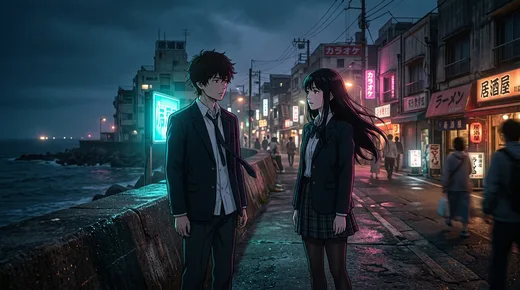
The boy and the girl face each other by the sea wall at night while the street behind them glows with karaoke, izakaya and ramen-shop signs
Neon night · Nano Banana 2

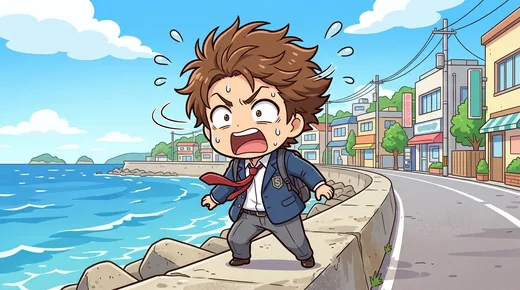
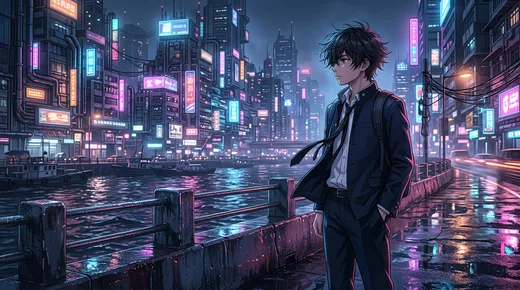
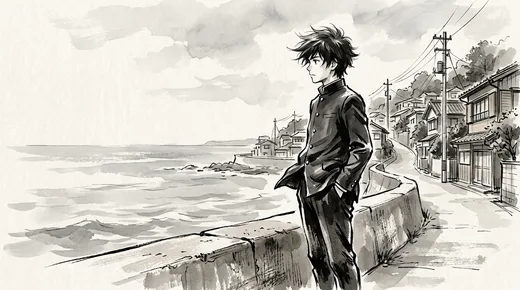
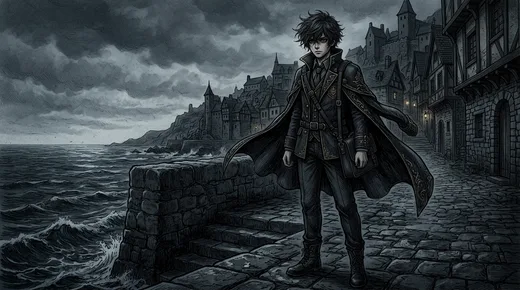
One hero, eight anime looks

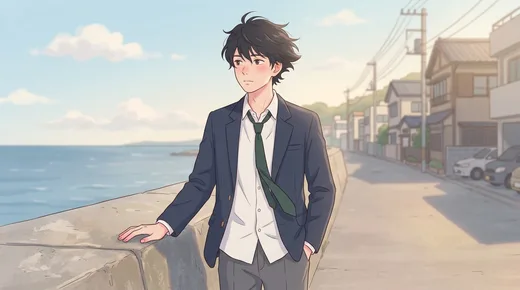
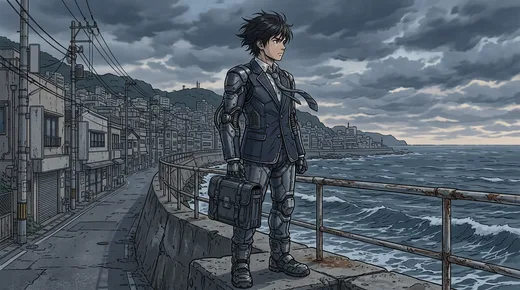
We gave Insaga a single description, a schoolboy in uniform at the seawall of a small seaside town, and changed nothing but the look. All eight frames were drawn with Nano Banana 2. In a project you choose the look once, at the start, and every frame of the episode is drawn in it. Insaga has more than 100 styles, anime and manga looks among them, and on the Director and Studio plans you can build your own from reference images.

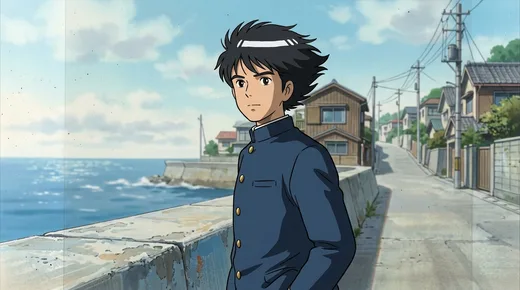
A black-haired schoolboy in a navy stand-collar uniform by a seawall, a quiet seaside street and power lines behind him, in soft airbrushed 1990s colours
90s OVA cel
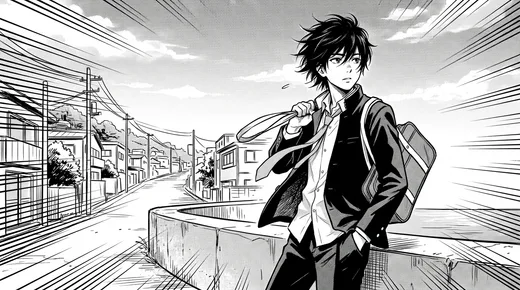
Black-and-white manga panel with speed lines: the boy, tie loosened, slings his school bag over his shoulder at the seawall
Manga screentone
A chibi version of the boy with messy brown hair yelling in panic on the seawall, sweat drops flying, a bright blue sea and colourful shops behind him
Chibi comedy
The boy with his hands in his pockets on a rain-slick waterfront at night, neon towers reflected in the water
Cyber neon
The boy drawn in loose black brushwork and grey ink washes, hands in pockets at the seawall, rooftops and power lines behind
Brush and ink wash
The boy in a long dark coat on a cobbled sea wall, a stone town with spires and storm clouds behind him
Dark fantasy
The boy in a navy blazer and green tie rests a hand on the seawall in soft pastel sunlight
Webtoon romance
The boy in armour plates over his school uniform carries a metal case along the seawall under grey clouds
Mecha line art

How to make an anime with AI, from story to episode

Text to anime sounds like one button. In practice an episode needs a story that holds together, characters who stay on-model, one look from the first frame to the last, voices and an edit. Insaga works through them in that order: you make the director's decisions, and the drawing is done for you.

  1. Paste the story

    A chapter of a web novel, the script of the manga you are writing, a short story for your channel or a whole book: anything from a single page up. Insaga reads the text, splits it into scenes and works out who is in each one and where it takes place.

  2. Choose the look and the model

    Choose one of the anime or manga looks, or build a custom style from your own art or references on the Director and Studio plans, so the series keeps its look for as long as it runs. Then stay in Characters mode and draw with Nano Banana 2 or GPT Image 2.5: both keep a cast from frame to frame.

  3. Meet your cast on their model sheets

    Before a single scene is drawn, every character gets a reference sheet with poses and expressions, and every place gets its look. Fix a hairstyle, a uniform or a scar here, once. If you have already drawn your heroine, upload your drawing and her sheet is redrawn from it in the episode's look.

  4. Approve the frames, then animate

    Every scene is drawn as a still first, so you can check faces, framing and the order of shots while changes are cheap. Redraw one frame and the rest stay as they are. On the Studio plan approved frames are animated into 16:9 clips of about eight seconds each, and image and animation generation is unlimited.

  5. Voice it, subtitle it, cut it

    Give every character a voice of their own from more than 6,000, and add a narrator if the story has one. The script can be translated into any of 27 languages before it is voiced, Japanese and Korean included. The timeline lines the clips up with the voices; add subtitles in one of 31 styles, your own opening theme, transitions and camera moves, and export an MP4 in up to 4K.

The town is designed once, like the cast

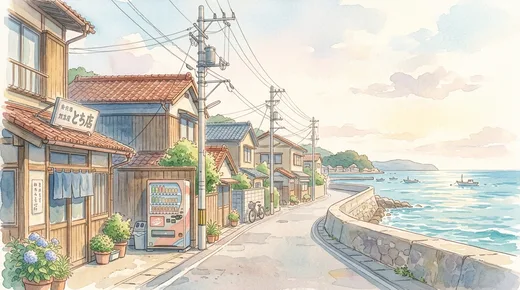
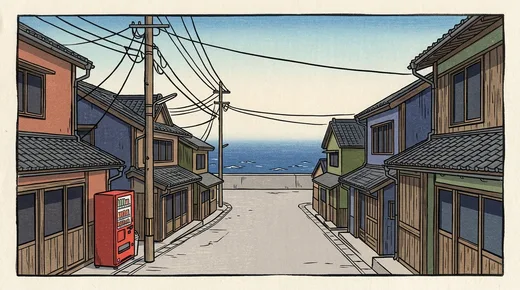
An anime is remembered by its places as much as by its faces: the classroom, the station platform, the street that runs down to the sea. In a project each place is designed once and reused in every scene set there, so viewers know where they are before anyone speaks. This is the empty street from our brief, in three looks.

One seaside street, three looks

A seaside street in soft watercolour: a wooden shop with a sign, potted hydrangeas and a vending machine, the road curving along the seawall to a calm sea with small boats
Soft watercolour
The same street as a framed woodblock print: red, blue and green wooden houses, a red vending machine and power lines, the road running straight down to the sea
Woodblock print
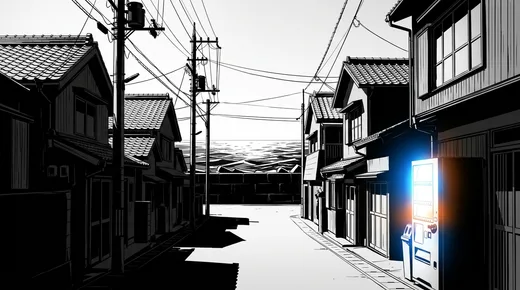
The street in stark black and white with deep shadows, a vending machine glowing blue among dark wooden houses, the sea at the end of the road
Dark manhwa

Keeping a character on-model from pilot to finale

Anime studios keep a model sheet for every character so that dozens of animators draw the same face. Insaga does the same inside a project: a character's sheet is the reference for every frame they appear in, so the heroine in the last scene has the same eyes, hair clip and uniform as in the first, whether she is laughing, crying or shouting.

From episode to episode, you carry the cast. Nothing moves between projects on its own. When an episode is finished, save your characters' pictures. When the next chapter goes in and the cast is drawn again, upload the saved picture onto each returning character, and their sheet is redrawn from it in the new episode's look. Choose the same voices, and the cast looks and sounds the way it did last week.

Your own designs. If you drew the characters yourself, for a manga, a webcomic or a pitch, upload your drawings instead of the generated pictures. The sheets are redrawn from them in the project's look, which is how your designs get into motion.

One look per series. A custom style built from your references is saved to your account and works on the next episode like any other style, so episode ten looks drawn by the same hand as episode one.

Nano Banana 2 or GPT Image: which draws anime better?

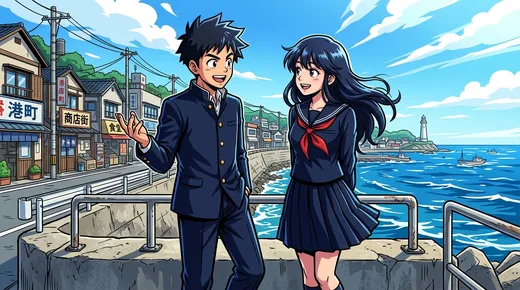
Both models are in the studio, and both keep a cast in Characters mode. Below is one look, shōnen action, and one brief, two classmates at the seawall, drawn once by each model.

Shōnen-action look: a boy in a black stand-collar uniform gestures as he talks to a girl in a sailor uniform at the seawall railing, shop signs on the left, a lighthouse and boats on a bright sea

Nano Banana 2

Google's model and the studio default. In this pair it kept everything the brief asked for: both classmates full-length at the railing, the shop signs of the harbour street and a lighthouse on the point. Try it when the staging has to read at a glance.

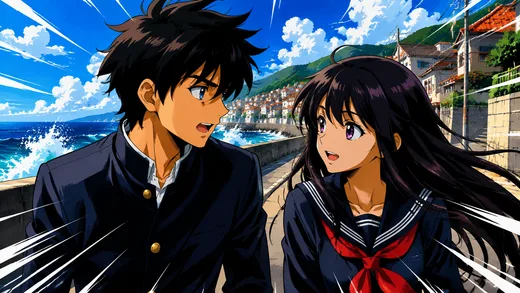
The same look and brief as a close-up: the boy turns sharply towards the girl, speed lines at the edges, waves bursting over the seawall behind them

GPT Image

OpenAI's model. This frame was drawn in July 2026 with an earlier version; the studio now runs GPT Image 2.5. Here the model went for drama: the two of them in a tight close-up, speed lines, spray over the wall. Try it for reactions and turning points.

Everything else an anime episode needs

Expressions that stay in character
Character sheets carry poses and expressions, so a hero can sulk, cry or explode with rage and still look like the same character.
A voice cast
More than 6,000 voices. The hero, the rival and the narrator each get their own, and you pick the same ones again next episode.
Subtitles in your channel's look
Subtitles are generated automatically, in 31 styles. Translate the script into any of 27 languages before voicing and release the episode for another audience.
Your opening theme
Add your own music track: an opening, an ending, or something quiet under a scene by the sea.
A camera that follows the storyboard
12 camera motions, 15 transitions and 14 filters: a slow push-in on a confession, a pan across a city at night.
Thumbnails for the channel
Make each episode's YouTube thumbnail in the same studio, starting from one of 79 templates.
A season on autopilot
On the Studio plan, autopilot takes a story through frames, animation, voices and the timeline to an exported episode in one run.
Export for YouTube
MP4 in 16:9 or the wider 2.35:1, from 720p to 4K, without an Insaga watermark.

What people make with an AI anime generator

Anime story channels. A new original story every week, with recurring heroes, one look and one narrator. For a channel, an anime story generator is only useful if it brings back the same heroes, not one pretty clip: the text goes in, a voiced, edited episode comes out, and the heroes look the way subscribers remember them.

Manga and light novels to anime. Web-novel and light-novel authors turn a chapter into a pilot episode, or into a trailer that shows the world instead of describing it. A manga artist can watch the next chapter move before inking a single page.

Original series in a look fans love. Your own heroes in 90s cel, black-and-white manga or dark fantasy: the feel of the shows you grew up on, with characters that belong to you and not to a studio.

Anime shorts. A confession at the seawall, a single duel, one scene from a longer story: short 16:9 films for YouTube and a portfolio. Vertical versions for TikTok, Reels and YouTube Shorts are coming soon.

Insaga compared with a single-clip anime video generator

Most AI anime video generators turn one prompt or one picture into one clip. That is quick for a single moment and slow for a story, because the story, the cast and the edit are left to you. In general terms:

InsagaSingle-clip generator
What you give itA chapter, a script or a whole bookA prompt or a picture for each clip
CharactersA model sheet drawn once and used in every frameDescribed or uploaded again for every clip
The lookOne anime look for the whole episode, from 100+ styles or your ownChosen clip by clip, and it can drift
Scenes and shotsPlanned from your textYou plan and order every shot yourself
VoicesA voice for each character, from 6,000+Usually none, or a separate tool
Subtitles and editBuilt-in timeline, subtitles, your music, export up to 4KDownload the clips and edit elsewhere
Vertical 9:16Coming soonOften available
What you getA voiced, edited episodeSeparate clips

A general comparison: tools differ and change quickly. For side-by-side pages on specific tools, see all comparisons.

Questions about the AI anime generator

Is the AI anime generator free to start?

Yes. A new account gets 100 credits once, with no card, which is enough to design your cast and draw the first frames of an episode, so you meet your characters before you pay. Animation, voiceover and export are on paid plans; on the Studio plan image and animation generation is unlimited. The plans are on the pricing page.

Can I turn my manga or light novel into an anime?

Yes, starting from the text. Paste the chapters, anything from a single page to a whole book; if a book is longer than one project takes, the limit is raised for your account on request. Insaga works from words, not scanned pages, so for a manga paste the script: what happens and who says what. If you drew the characters yourself, upload your drawings and their sheets are redrawn from them.

Can I copy the style of a famous anime or studio?

No, and we do not promise imitations of named studios or shows. The looks on this page are genre looks, such as 90s cel or black-and-white manga, not copies of a series, and you can build a custom style from reference images you have the rights to use. The Acceptable Use Policy rules out copyrighted characters, brands and artwork you do not hold rights to, so bring heroes of your own.

Which is better for anime, Nano Banana 2 or GPT Image 2.5?

Both work, and both keep a cast in Characters mode. In the shōnen pair above, Nano Banana 2 kept the whole scene from the brief, while GPT Image went for a dramatic close-up. Nano Banana 2 is the default; the simplest test is to draw the same passage with each and keep the one that suits the episode. Nano Banana Pro is available too, but only in Illustration mode, which draws each scene straight from the text without character sheets, so it is not the model for a recurring cast.

Can the characters talk?

They can speak: each character gets a voice of their own from more than 6,000, and a narrator can go on top. Before voicing, the script can be translated into 27 languages, Japanese among them. Lips that move in time with the words need lip sync, which is in early access and is being opened gradually.

Can I use my AI anime commercially?

Under the Terms you get a non-exclusive, worldwide licence to use, change and distribute what you generate, commercial use included, and paid plans export without an Insaga watermark. Whether a channel earns money is the platform's decision, and platforms look for original work, so your own story and characters matter most.

Can I make vertical anime shorts for TikTok, Reels or YouTube Shorts?

Not yet. Vertical 9:16 is coming soon. Today Insaga exports 16:9 and the wider 2.35:1, in 720p, 1080p or 4K, which suits YouTube episodes and short anime films.

Is this a photo-to-anime filter?

No. Insaga does not turn a selfie into an anime portrait. It makes anime stories: it designs characters from your text, draws scenes with them and turns the frames into a voiced, edited video.

Keep exploring

Paste your first chapter and meet your cast

Start with one scene or a whole volume. Your first 100 credits are free and need no card: enough to see your characters on their model sheets and in the first frames.

Works in the browser. No install.

All frames on this page were made in Insaga from one text brief: a schoolboy, a classmate and a street by the sea. The looks are genre looks, not copies of any show. Insaga is an independent product and is not affiliated with, endorsed or sponsored by Google or OpenAI; Nano Banana and GPT Image are named only to say which models are available in Insaga.